
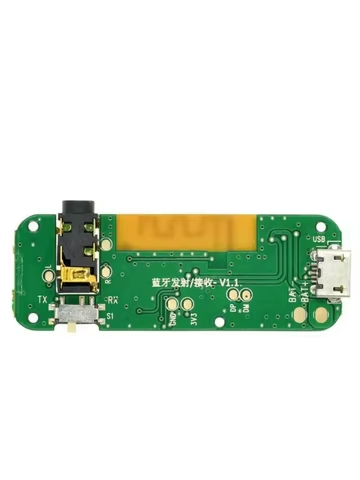
The Bluetooth 5.0 Transmitting and Receiving Audio Module with Built-in Power Amplifier is a versatile, 2-in-1 DIY electronic board designed to add wireless stereo capabilities to your speakers, headphones, or computers. It operates as both a dual-mode wireless adapter and an efficient audio amplifier, making it highly useful for creating custom Bluetooth headphones, upgrading legacy home stereo systems, or building DIY wireless desktop setups.
Core Technical Specifications
- Bluetooth Version: Bluetooth 5.0
- Operating Voltage: Typically operates on a 5V DC micro-USB interface or a 3.7V lithium battery
- Audio Channel: Dual-channel stereo output
- Dimensions: Ultra-compact design, typically around 1 x 1 x 1 cm for surface mount (SMD) integration
- Operating Temperature: Highly resilient, running from -40°C to 80°C
Dual-Mode Functionality
[ TX Mode ] Non-BT Source (e.g., PC) —> Module (Transmits) —> Bluetooth Headphones [ RX Mode ] Smart Device (e.g., Phone) —> Module (Receives) —> Wired Amplifier/Speakers
1. Receiving Mode (RX)
In RX mode, the module functions as a standard Bluetooth receiver, turning wired audio equipment into smart, wireless setups.
- Application: Wirelessly streams audio from smartphones, tablets, or laptops directly to legacy amplifiers, wired headphones, or car stereos.
- Setup Guide:
- Turn the physical toggle switch or button control to the RX position.
- Press and hold the power button for 3 seconds until the blue LED light flashes rapidly.
- Open Bluetooth settings on your smartphone or source device and scan for the audio module name (commonly listed as “Audio” or “JH-BT”).
- Pair and connect. The blue light will stay solid once a successful connection is established.
2. Transmitting Mode (TX)
In TX mode, the module accepts a physical audio input and broadcasts it wirelessly to any nearby Bluetooth device.
- Application: Pulls audio from a desktop computer via USB or a 3.5mm auxiliary port and streams it directly to your favorite wireless earbuds or external Bluetooth speakers.
- Setup Guide: Switch the physical control toggle to TX and power on the module next to your Bluetooth headphones in pairing mode. The module will automatically scan and bind to the closest available open Bluetooth audio stream.