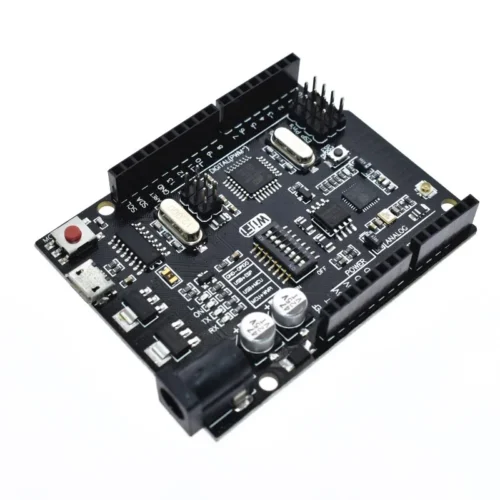
The Arduino Uno + WiFi R3 (ATmega328P+ESP8266) is a hybrid development board that integrates a standard ATmega328P microcontroller with an ESP8266 Wi-Fi module and 32Mb (4MB) of flash memory on a single PCB. This specialized board uses a CH340G USB-to-TTL converter and an onboard DIP switch to toggle between programming and communication modes for either chip.
Key Hardware Specifications:
- Microcontrollers: Features both an ATmel ATmega328P (8-bit) and an Espressif ESP8266 Wi-Fi IC.
- Memory: Includes 32Mb (4 Megabytes) of flash memory dedicated to the ESP8266 module, which is significantly higher than the standard ESP-01 module’s memory.
- USB Interface: Uses a CH340G USB-to-serial converter and typically features a Micro USB port instead of the standard bulky USB-B connector.
- Power Input: Supports 5V via USB (500mA max) or 9–24V via the DC Jack/VIN pin.
- I/O Layout: Standard Uno R3 pinout with 14 digital I/O pins (6 PWM) and 6 analog input pins.
Mode Selection (DIP Switch Settings) :
The board’s most critical feature is its 8-position DIP switch, which determines how the two processors interact with the USB port and each other. Common configurations include:
- USB to ATmega328P: Allows for standard Arduino programming (Switches 3 and 4 ON).
- USB to ESP8266: Used for updating ESP8266 firmware or uploading sketches via the Arduino IDE (Switches 5, 6, and 7 ON).
- ATmega328P to ESP8266: Enables serial communication between the two chips for IoT data transmission (Switches 1 and 2 ON).
- Independent Mode: All switches OFF allows both modules to run their existing code independently without serial interference.
Programming & Software Support:
- Arduino IDE: Fully compatible with the Arduino IDE. Users must install the ESP8266 community board manager to program the Wi-Fi module.
- Drivers: Requires the CH340 driver for the computer to recognize the board over USB.
- Firmware: Often comes pre-loaded with ESP8266 AT firmware, which allows the ATmega328P to control Wi-Fi via AT commands unless a custom sketch is uploaded directly to the ESP8266.
How to Program the Arduino Uno + WiFi R3
Step 1: Download the Driver
Step 2: Write and Prepare Your Code
- Open the Arduino Integrated Development Environment (IDE) and write your code.
- Once you’ve finished writing your sketch, proceed to the next step.
Programming ATmega
-
-
Set dip-switches (3,4) ON and (5,6,7) OFF.
-
Select Arduino UNO as the board in the Arduino IDE.
-
Ensure the correct COM port is selected.
-
Enable verbose output during upload in Arduino preferences.
-
Upload the sketch and press the red reset button after the initial few lines of the upload process.
Programming ESP8266
-
-
Set dip-switches (5,6,7) ON and (4,5) OFF.
-
Download and install the ESP8266 community board manager.
-
Select Generic ESP8266 module.
-
Reset the board using the red reset button before uploading.
-
Upload the sketch.
-
After uploading, set dip-switch 7 to OFF to retain the sketch after reboot.
FAQ:
1. What is the microcontroller used in this board?
- The microcontroller is ATmega328P.
2. What WiFi module does this board use?
- It uses the ESP8266 module with 32Mb memory.
3. What USB converter is included?
- The board includes a USB-TTL CH340G converter.
4. What is the recommended supply voltage?
- The recommended supply voltage is 6~9V.
5. Can this board be customized for specific applications?
- Yes, this board can be customized.