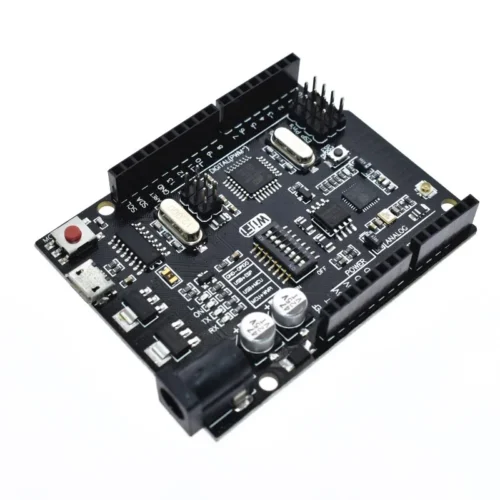
The Arduino Uno + WiFi R3 (ATmega328P+ESP8266) is a hybrid development board that integrates a standard ATmega328P microcontroller with an ESP8266 Wi-Fi module and 32Mb (4MB) of flash memory on a single PCB. This specialized board uses a CH340G USB-to-TTL converter and an onboard DIP switch to toggle between programming and communication modes for either chip.
Key Hardware Specifications:
- Microcontrollers: Features both an ATmel ATmega328P (8-bit) and an Espressif ESP8266 Wi-Fi IC.
- Memory: Includes 32Mb (4 Megabytes) of flash memory dedicated to the ESP8266 module, which is significantly higher than the standard ESP-01 module’s memory.
- USB Interface: Uses a CH340G USB-to-serial converter and typically features a Micro USB port instead of the standard bulky USB-B connector.
- Power Input: Supports 5V via USB (500mA max) or 9–24V via the DC Jack/VIN pin.
- I/O Layout: Standard Uno R3 pinout with 14 digital I/O pins (6 PWM) and 6 analog input pins.
Mode Selection (DIP Switch Settings) :
The board’s most critical feature is its 8-position DIP switch, which determines how the two processors interact with the USB port and each other. Common configurations include:
- USB to ATmega328P: Allows for standard Arduino programming (Switches 3 and 4 ON).
- USB to ESP8266: Used for updating ESP8266 firmware or uploading sketches via the Arduino IDE (Switches 5, 6, and 7 ON).
- ATmega328P to ESP8266: Enables serial communication between the two chips for IoT data transmission (Switches 1 and 2 ON).
- Independent Mode: All switches OFF allows both modules to run their existing code independently without serial interference.
Programming & Software Support:
- Arduino IDE: Fully compatible with the Arduino IDE. Users must install the ESP8266 community board manager to program the Wi-Fi module.
- Drivers: Requires the CH340 driver for the computer to recognize the board over USB.
- Firmware: Often comes pre-loaded with ESP8266 AT firmware, which allows the ATmega328P to control Wi-Fi via AT commands unless a custom sketch is uploaded directly to the ESP8266.
How to Program the Arduino Uno + WiFi R3
Step 1: Download the Driver
Step 2: Write and Prepare Your Code
- Open the Arduino Integrated Development Environment (IDE) and write your code.
- Once you’ve finished writing your sketch, proceed to the next step.
Programming ATmega
Set dip-switches (3,4) ON and (5,6,7) OFF.
Select Arduino UNO as the board in the Arduino IDE.
Ensure the correct COM port is selected.
Enable verbose output during upload in Arduino preferences.
Upload the sketch and press the red reset button after the initial few lines of the upload process.
Programming ESP8266
Set dip-switches (5,6,7) ON and (4,5) OFF.
Download and install the ESP8266 community board manager.
Select Generic ESP8266 module.
Reset the board using the red reset button before uploading.
Upload the sketch.
After uploading, set dip-switch 7 to OFF to retain the sketch after reboot.
FAQ:
1. What is the microcontroller used in this board?
- The microcontroller is ATmega328P.
2. What WiFi module does this board use?
- It uses the ESP8266 module with 32Mb memory.
3. What USB converter is included?
- The board includes a USB-TTL CH340G converter.
4. What is the recommended supply voltage?
- The recommended supply voltage is 6~9V.
5. Can this board be customized for specific applications?
- Yes, this board can be customized.