

Project 12
Joystick Servo Motor Control - Arduino Uno
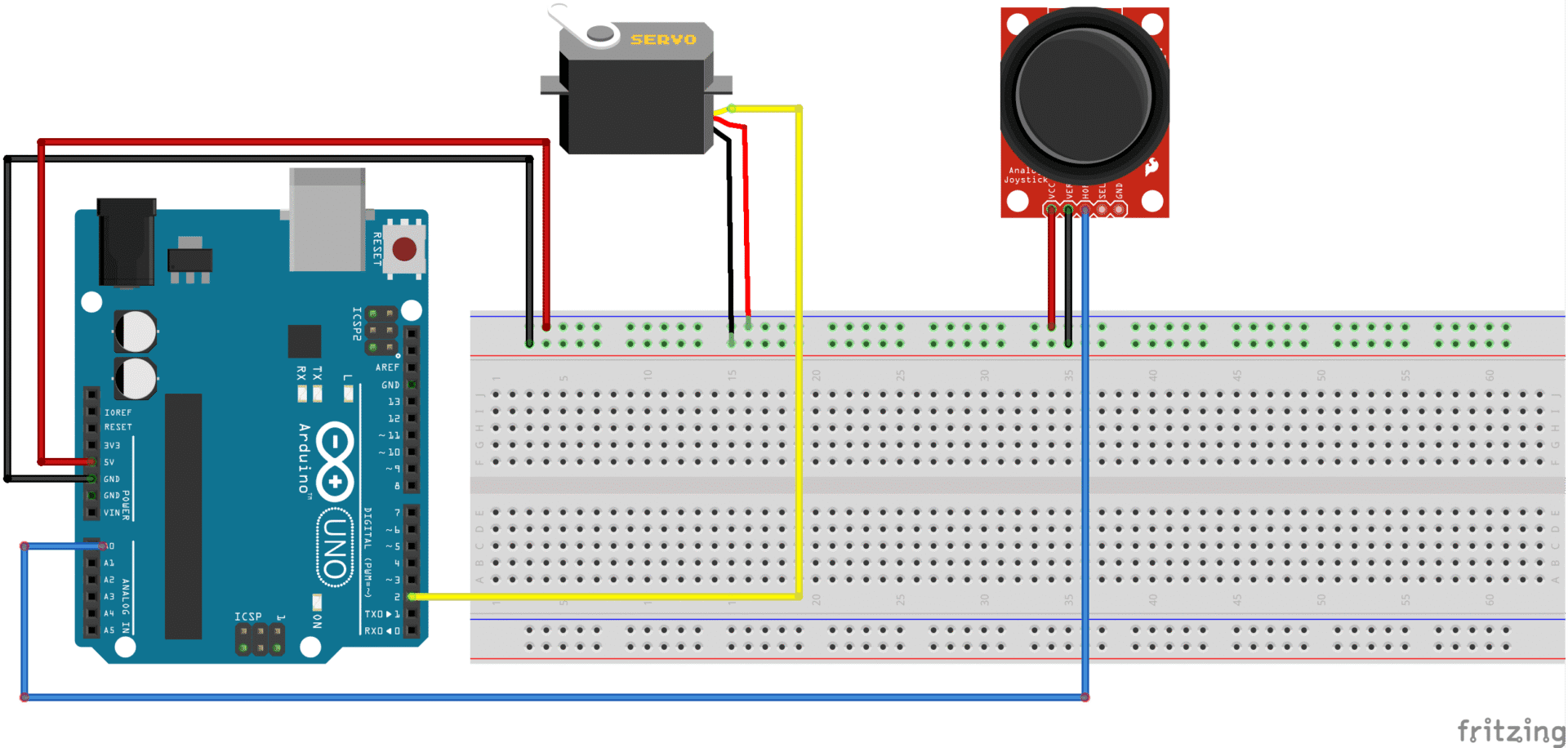
Project Description
Servo joystick control on Arduino involves using a 2-axis analog joystick to set the position of a servo motor. The joystick outputs varying voltages as it is moved, and the Arduino reads these values through its analog input pins. The Arduino then maps these readings (0–1023) to a servo angle (0–180°) and sends a PWM signal to the servo. As you move the joystick, the servo smoothly rotates to the corresponding position, allowing intuitive manual control for robotics or pan-tilt systems.
Components
- Arduino Uno
- Joystick
- Jumper wires
- Servo motor
- Breadboard
Code
#include<Servo.h>

#define SERVO_PIN 2
Servo myServo;

void setup()
{
  myServo.attach(SERVO_PIN);
}

void loop()
{
  int joystickValue = analogRead(A0);
  int output = map(joystickValue, 0, 1023, 0, 180);
  myServo.write(output);
  delay(2);
}
Taking things further
- Make into a 3D pan/tilt/zoom robot manipulator
- Add wireless control
- Add a claw to make a picker
Find robotics kits and parts on our website