
DS1302 Real Time Clock (RTC) with LCD - Arduino Uno
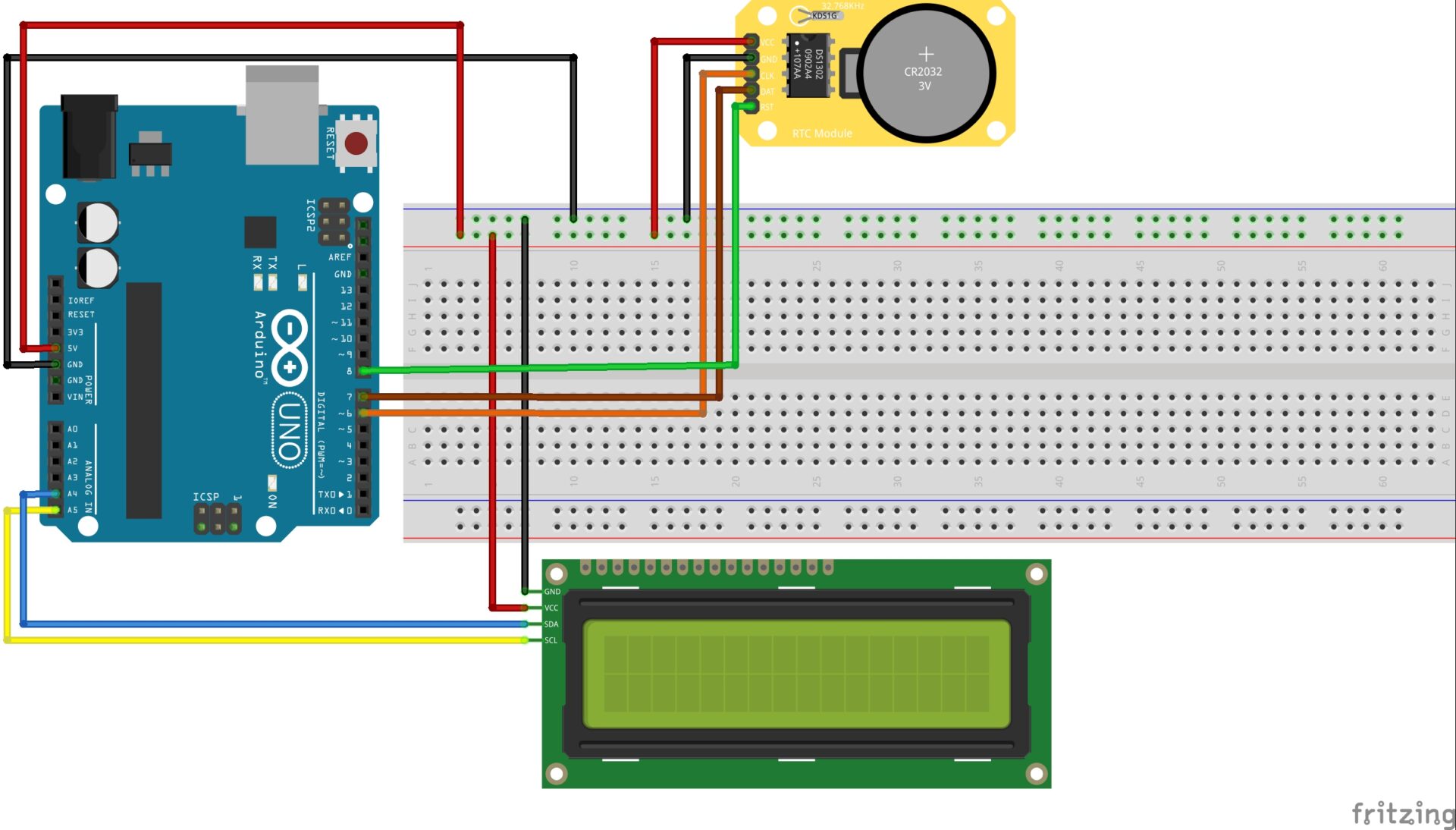
-

- Initialising DS1302 RTC
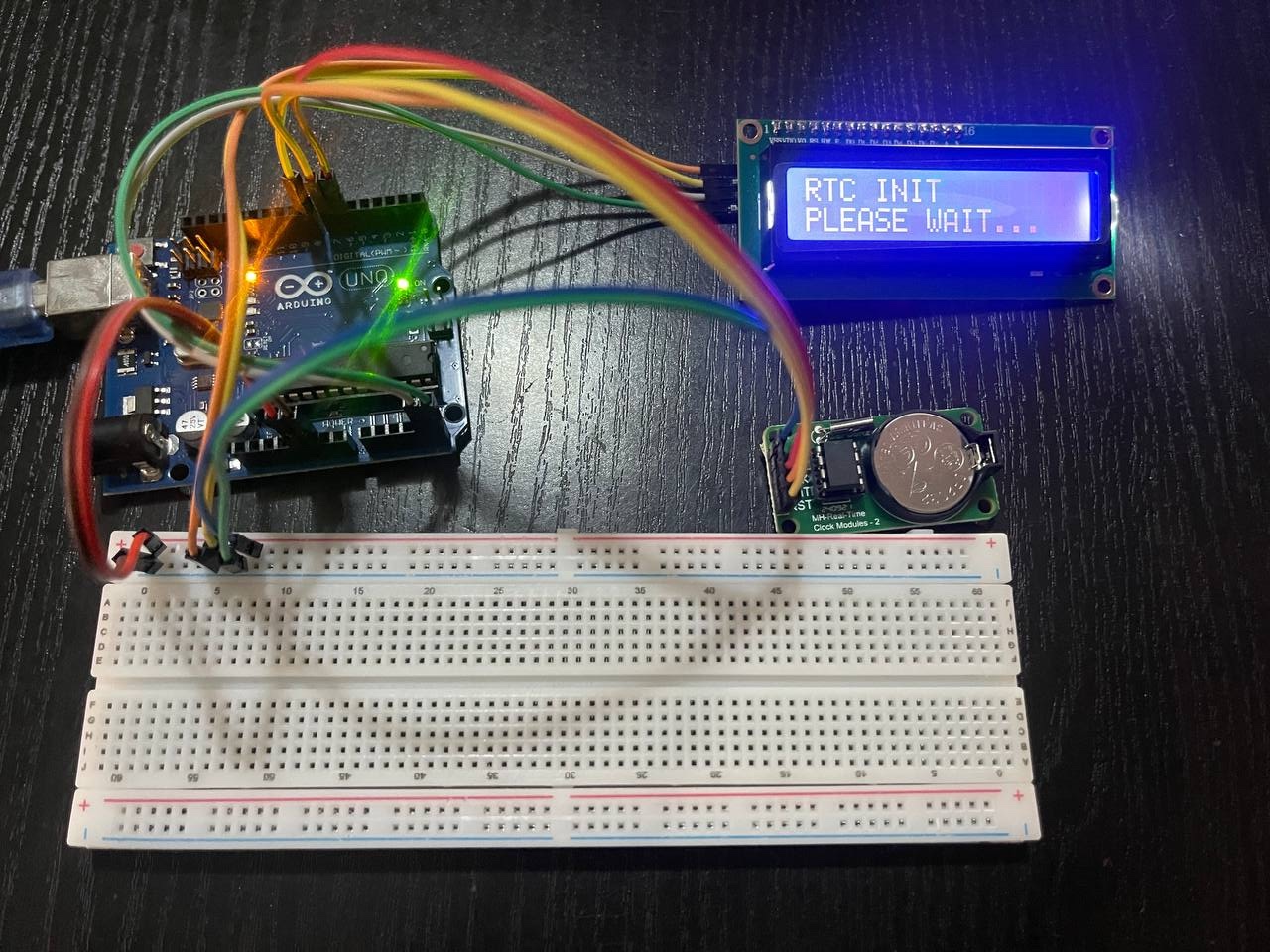
-
- DS1302 RTC Startup Complete
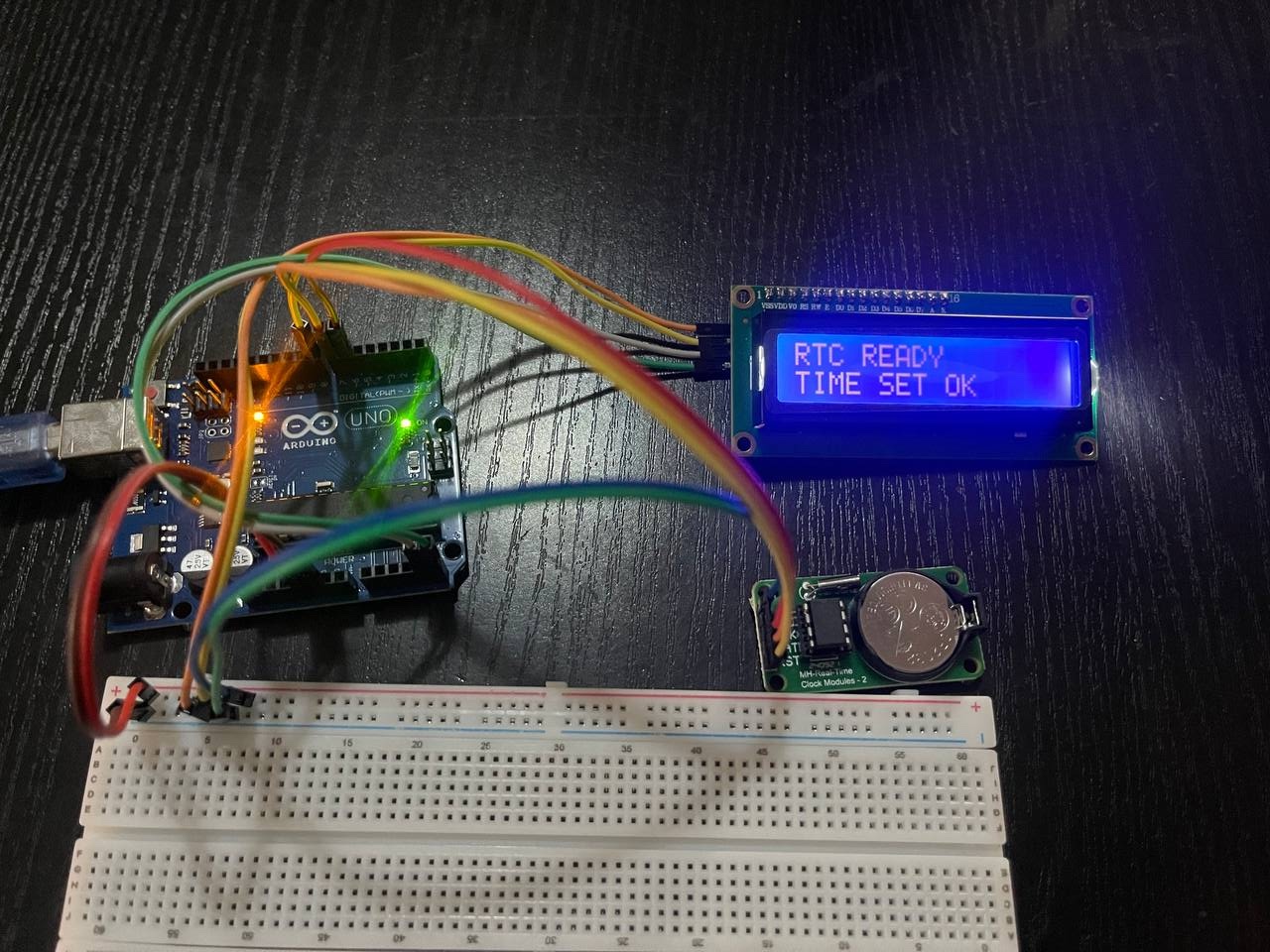
-
- LCD + RTC showing Time
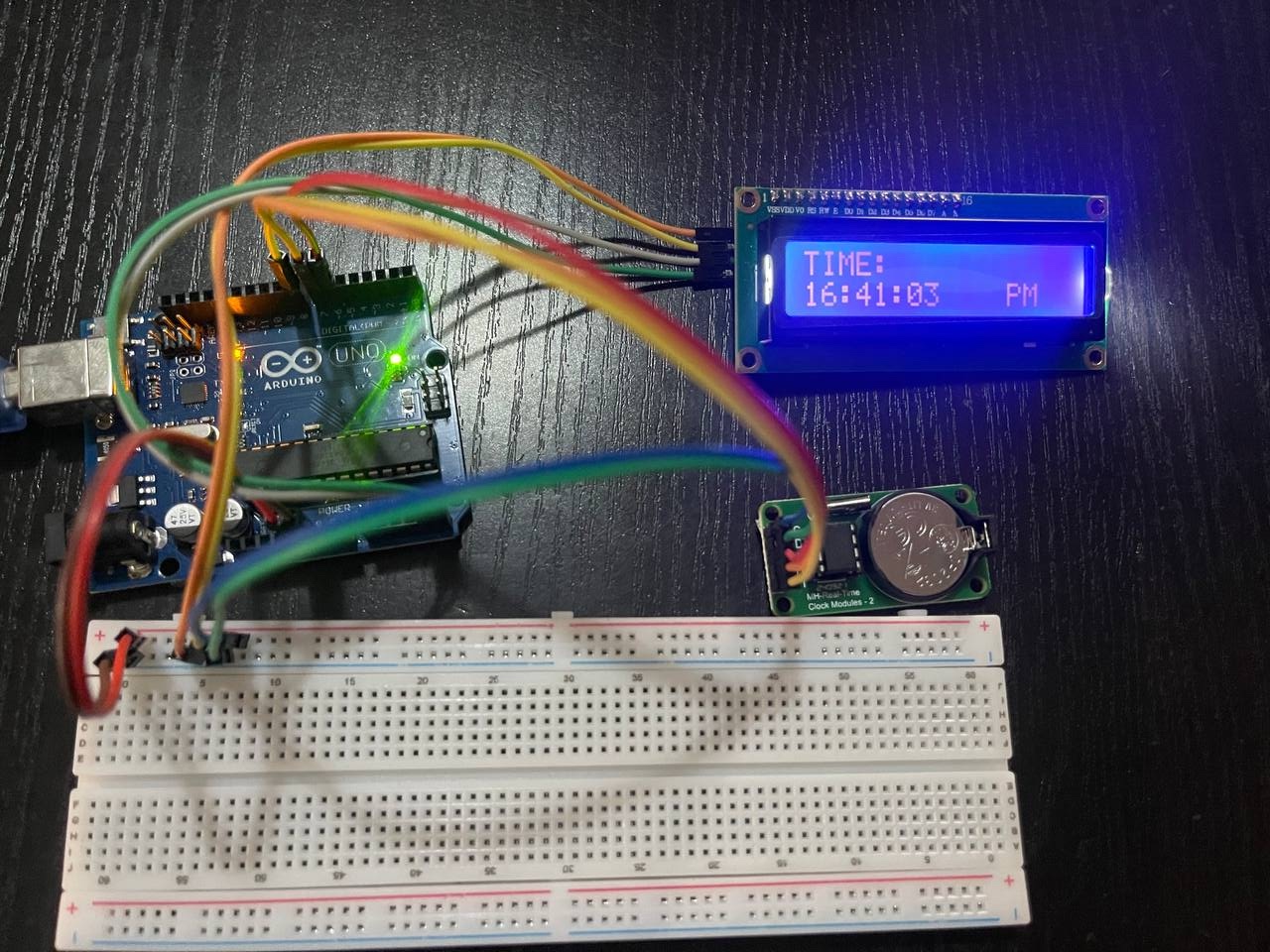
-
- LCD + RTC showing Date
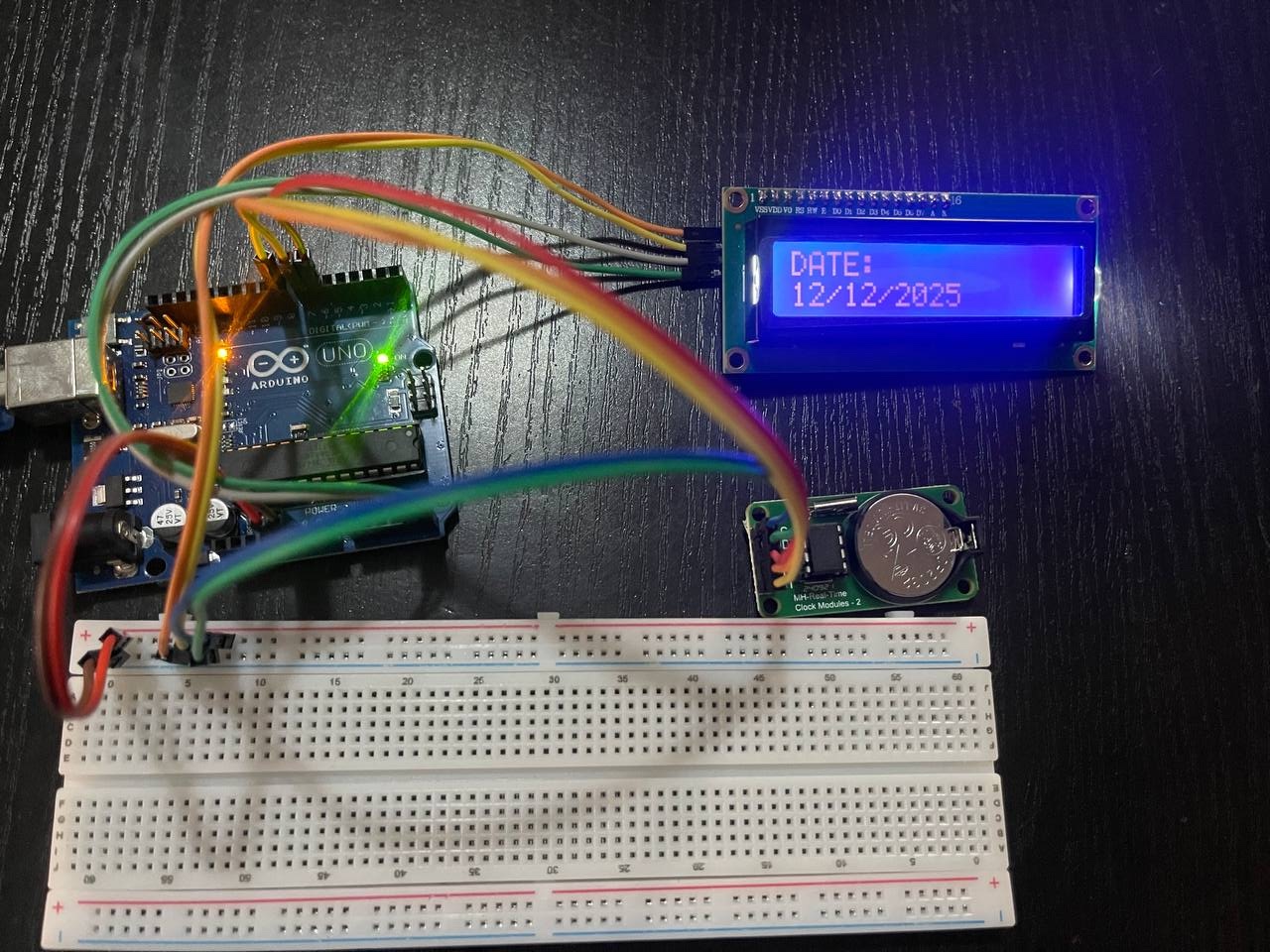
The DS1302 Real-Time Clock (RTC) is a low-power timekeeping IC used to maintain accurate time and date in embedded electronic projects. When combined with an Arduino and an LCD display, it provides a complete digital clock system that can show the current time and date in real time. An RTC is necessary to keep time since computers, which is what the Arduino is, do not inherently keep time.
The DS1302 RTC module keeps track of seconds, minutes, hours, day, date, month, and year, even when the Arduino is switched off. This is made possible by a backup coin-cell battery (CR2032) on the module, which ensures that the clock runs continuously without resetting.
The Arduino reads the real-time data from the DS1302 and displays it on a 16×2 LCD using the I2C communication protocol. The LCD allows the current time (hours, minutes, seconds) and date to be shown clearly to the user.
- Arduino Uno
- Jumper wires
- LCD
- Breadboard
- DS1302 RTC Module
- CR2032 Coin cell (not included)
#include <Wire.h>
#include <LiquidCrystal_I2C.h>
#include <ThreeWire.h>
#include <RtcDS1302.h>

// LCD Setup (I2C address, columns, rows)
LiquidCrystal_I2C lcd(0x27, 16, 2); // Change 0x27 to your LCD's I2C address

// DS1302 RTC Wiring:
// CE (RST)  -> Arduino pin 8
// IO (DAT)  -> Arduino pin 7
// SCLK      -> Arduino pin 6

ThreeWire myWire(7, 6, 8); // DAT, CLK, RST
RtcDS1302<ThreeWire> rtc(myWire);

// Time display variables
String daysOfWeek[7] = {"Sun", "Mon", "Tue", "Wed", "Thu", "Fri", "Sat"};
bool showDate = true;
unsigned long lastToggle = 0;
const unsigned long toggleInterval = 3000;

// ======================================================================
// SETUP
// ======================================================================

void setup() {
  Serial.begin(9600);
  delay(1000);

  Serial.println("DS1302 RTC with LCD Display");
  Serial.println("==========================");

  // Initialize LCD
  lcd.init();
  lcd.backlight();
  lcd.clear();
  lcd.setCursor(0, 0);
  lcd.print("RTC INIT");
  lcd.setCursor(0, 1);
  lcd.print("PLEASE WAIT...");
  delay(2000);

  // Initialize RTC
  rtc.Begin();

  // Try to get current time
  RtcDateTime now = rtc.GetDateTime();

  // Check if RTC has valid time
  if (!rtc.IsDateTimeValid()) {
    Serial.println("RTC has invalid time!");
    Serial.println("Setting to compile time...");

    lcd.clear();
    lcd.setCursor(0, 0);
    lcd.print("SETTING TIME");
    lcd.setCursor(0, 1);
    lcd.print("PLEASE WAIT");

    // Set to compile time
    RtcDateTime compiled = RtcDateTime(__DATE__, __TIME__);
    rtc.SetDateTime(compiled);

    // Save the time
    now = rtc.GetDateTime();

    // Verify
    if (!rtc.IsDateTimeValid()) {
      Serial.println("Failed to set time!");
      lcd.clear();
      lcd.setCursor(0, 0);
      lcd.print("TIME SET FAILED");
      lcd.setCursor(0, 1);
      lcd.print("CHECK RTC MODULE");
      while(1); // Stop here
    }

    delay(2000);
  }

  // Check if RTC is running
  if (!rtc.GetIsRunning()) {
    Serial.println("RTC is not running, starting it...");
    rtc.SetIsRunning(true);
  }

  // Disable write protection
  if (rtc.GetIsWriteProtected()) {
    Serial.println("Disabling write protection...");
    rtc.SetIsWriteProtected(false);
  }

  Serial.println("RTC initialized successfully!");

  // Display initial info
  lcd.clear();
  lcd.setCursor(0, 0);
  lcd.print("RTC READY");
  lcd.setCursor(0, 1);
  lcd.print("TIME SET OK");
  delay(2000);

  // Show initial time
  displayDateTime();
}

// ======================================================================
// LOOP
// ======================================================================

void loop() {
  // Toggle between time and date every 3 seconds
  if (millis() - lastToggle > toggleInterval) {
    showDate = !showDate;
    lastToggle = millis();
  }

  // Update display every second
  static unsigned long lastUpdate = 0;
  if (millis() - lastUpdate >= 1000) {
    displayDateTime();
    lastUpdate = millis();
  }

  delay(100);
}

// ======================================================================
// DISPLAY DATE AND TIME FUNCTION
// ======================================================================

void displayDateTime() {
  // Always check if time is valid
  if (!rtc.IsDateTimeValid()) {
    Serial.println("ERROR: RTC time is not valid!");
    lcd.clear();
    lcd.setCursor(0, 0);
    lcd.print("RTC ERROR");
    lcd.setCursor(0, 1);
    lcd.print("TIME INVALID");

    // Try to recover
    RtcDateTime compiled = RtcDateTime(__DATE__, __TIME__);
    rtc.SetDateTime(compiled);
    delay(1000);
    return;
  }

  RtcDateTime now = rtc.GetDateTime();

  // Get time components
  int year = now.Year();
  int month = now.Month();
  int day = now.Day();
  int hour = now.Hour();
  int minute = now.Minute();
  int second = now.Second();
  int dayOfWeek = now.DayOfWeek();

  // Clear LCD
  lcd.clear();

  if (showDate) {
    // Display DATE on top line
    lcd.setCursor(0, 0);
    lcd.print("DATE:");

    lcd.setCursor(0, 1);
    // Format: DD/MM/YYYY
    if (day < 10) lcd.print("0");
    lcd.print(day);
    lcd.print("/");
    if (month < 10) lcd.print("0");
    lcd.print(month);
    lcd.print("/");
    lcd.print(year);

  } else {
    // Display TIME on top line
    lcd.setCursor(0, 0);
    lcd.print("TIME:");

    lcd.setCursor(0, 1);
    // Format: HH:MM:SS
    if (hour < 10) lcd.print("0");
    lcd.print(hour);
    lcd.print(":");
    if (minute < 10) lcd.print("0");
    lcd.print(minute);
    lcd.print(":");
    if (second < 10) lcd.print("0");
    lcd.print(second);

    // Add AM/PM indicator
    lcd.setCursor(12, 1);
    if (hour >= 12) {
      lcd.print("PM");
    } else {
      lcd.print("AM");
    }
  }

  // Print to serial monitor (every 5 seconds to avoid flooding)
  static unsigned long lastSerialPrint = 0;
  if (millis() - lastSerialPrint >= 5000) {
    printToSerial(year, month, day, hour, minute, second, dayOfWeek);
    lastSerialPrint = millis();
  }
}

// ======================================================================
// PRINT TO SERIAL MONITOR
// ======================================================================

void printToSerial(int year, int month, int day, int hour, int minute, int second, int dayOfWeek) {
  Serial.println("\n========= RTC TIME =========");
  Serial.print("Date: ");
  Serial.print(daysOfWeek[dayOfWeek]);
  Serial.print(", ");
  if (day < 10) Serial.print("0");
  Serial.print(day);
  Serial.print("/");
  if (month < 10) Serial.print("0");
  Serial.print(month);
  Serial.print("/");
  Serial.println(year);

  Serial.print("Time: ");
  if (hour < 10) Serial.print("0");
  Serial.print(hour);
  Serial.print(":");
  if (minute < 10) Serial.print("0");
  Serial.print(minute);
  Serial.print(":");
  if (second < 10) Serial.print("0");
  Serial.print(second);

  if (hour >= 12) {
    Serial.println(" PM");
  } else {
    Serial.println(" AM");
  }
  Serial.println("===========================\n");
}

// ======================================================================
// MANUALLY SET TIME FUNCTION
// ======================================================================

void setManualTime() {
  // Uncomment and modify to set a specific time
  /*
  Serial.println("Setting manual time...");

  // Format: Year, Month, Day, Hour, Minute, Second
  // Example: 2024, 12, 15, 14, 30, 0 = 15 Dec 2024, 2:30:00 PM
  RtcDateTime manualTime(2024, 12, 15, 14, 30, 0);

  // Disable write protection
  rtc.SetIsWriteProtected(false);

  // Set the time
  rtc.SetDateTime(manualTime);

  // Enable write protection (optional)
  // rtc.SetIsWriteProtected(true);

  Serial.println("Time set manually!");

  lcd.clear();
  lcd.setCursor(0, 0);
  lcd.print("TIME SET");
  lcd.setCursor(0, 1);
  lcd.print("MANUALLY OK");
  delay(3000);
  */
}

// ======================================================================
// TEST RTC FUNCTION
// ======================================================================

void testRTC() {
  Serial.println("Testing RTC module...");

  // Test 1: Check if RTC responds
  if (!rtc.IsDateTimeValid()) {
    Serial.println("FAIL: RTC time invalid");
    return;
  }

  // Test 2: Get current time
  RtcDateTime now = rtc.GetDateTime();
  Serial.println("PASS: Got current time");

  // Test 3: Check year range
  if (now.Year() < 2000 || now.Year() > 2100) {
    Serial.println("WARN: Year seems out of range");
  }

  Serial.println("RTC test completed!");
}
- The RTC Module can be set to the correct time and then the section of the code for setting can be commented out
- Add timestamps to logged data so that you know exactly when it happened
- Add keypad or use remote control for setting the clock